How Visual Occupancy Helps Coworking Operators Sell More and Price Smarter
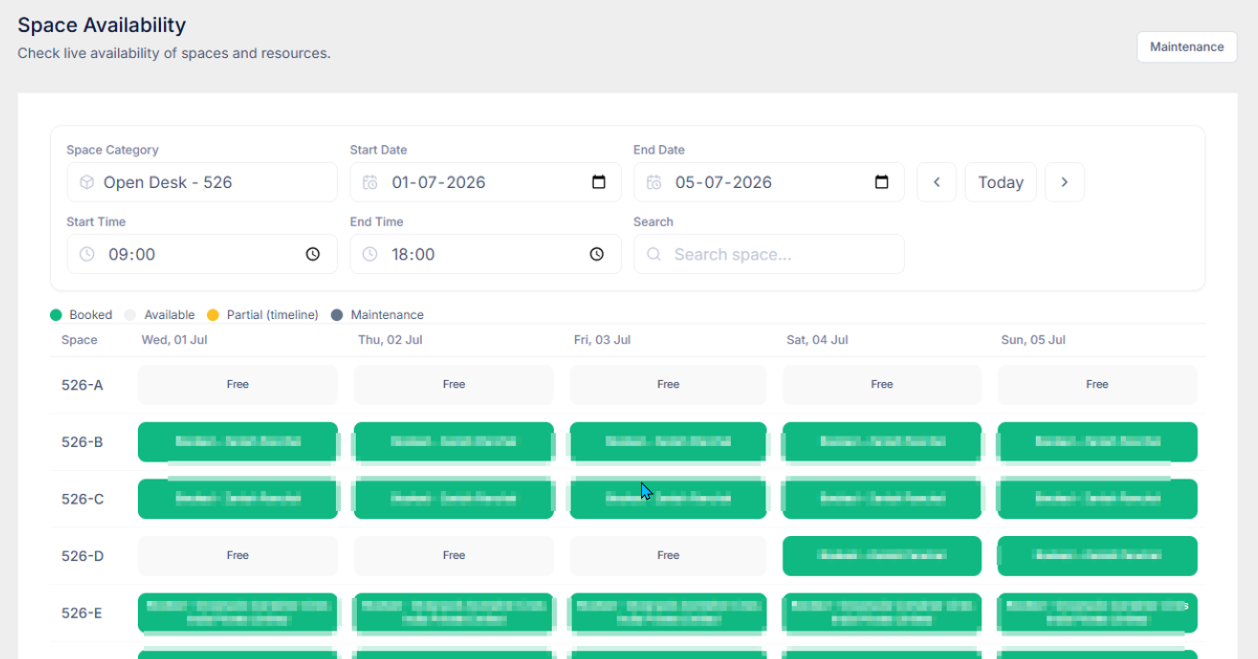
Occupancy is your inventory. When you see it on a visual floor layout — free, booked, and under maintenance — you know what is selling and what is sitting empty. That visibility lets the front desk sell open space on the spot and lets you change prices from evidence, not guesswork. Coworking App puts that layout, the occupancy dashboard, and utilization reports in one place.
On this page
Occupancy is your real inventory
A coworking space does not sell software, coffee, or community events as its main product. It sells time in a place: an open desk, a private cabin, a meeting room, sometimes a locker or a parking bay. Every hour those resources sit empty is inventory you did not sell.
Most operators already know their headline occupancy — "we are about 70% full." That single number is useful, and it is also easy to live with. It does not tell you which side of the floor is always taken, which cabin has been free for three weeks, or which meeting room books only on Tuesday afternoons. Those details are where money is left on the table.
Occupancy management is the habit of treating that detail as the business. You watch what is occupied, what is free, and what is blocked, then you use the pattern to sell and to price. A spreadsheet can hold the numbers. A visual layout makes the pattern impossible to miss.
What a visual layout shows
A list of bookings answers "who is in today?" A floor view answers "what does the space look like right now, and what will it look like on the day a prospect wants to start?"
In Coworking App, Space Availability draws your resources on a grid that follows the layout of the location. Pick a date. Each desk, cabin, and similar resource shows one of three states:
- Free — open to sell or book
- Booked — already taken for that day
- Maintenance — blocked, so it should not be promised to a member or a lead
Filters let you isolate available, booked, or maintenance spaces instead of scanning the whole floor. Meeting rooms and conference rooms work differently, because they turn over by the hour. Those open a day calendar so you can see the open slots, rather than a single booked-or-free label for the whole day.
That is the visibility most operators are missing. The front desk no longer has to reconstruct the floor from a booking list, a WhatsApp thread, and a whiteboard. The picture is the source of truth for that date.
See what is selling and what is not
Demand in a coworking space is rarely even. Window cabins go first. Desks near the pantry stay full. A row by the service corridor stays empty, and everyone on the team has a theory about why. Until you look at the same layout across several days, those theories stay theories.
Walk the visual layout for today, then for a few days ahead. The pattern usually falls into three groups:
- Chronic full. The same cabins or desks are booked almost every day you check. That product is selling. Scarcity is real, and prospects who want that exact type of space will hear "we are full" unless you have a waitlist or a higher tier.
- Chronic empty. The same resources stay free most weeks. That product is not selling at the current price, plan, or position on the floor. Leaving the rate unchanged is a decision — it just is not a conscious one.
- Blocked, not unsold. A space in maintenance looks empty on the floor and full in your head. If you count it as available inventory, your occupancy number flatters you and your sales team may promise a room you cannot hand over.
Say a six-seat cabin near the entrance is booked every week you open the layout, while two identical cabins at the back stay free. The building is not "70% occupied" in any way that helps you act. One product is sold out. Another is not moving. Those are different problems, and they need different responses.
How visibility supports sales
Sales in a coworking space often happens in the lobby. A lead walks in, asks what is available from Monday, and the person at the desk either knows or goes to check. The check is where deals cool off: a wrong cabin is offered, a room that is already booked is promised, or the team defaults to "let me call you back."
A live layout changes that conversation. During a tour you can show what is actually free on the start date the lead cares about. You can offer a day pass into an open-desk zone that would otherwise sit empty. You can stop selling a cabin the layout already marks as booked, and point the lead at the one that is free. You can also see maintenance before you walk someone into a room that is out of service.
The same view helps between tours. If open desks are consistently free in the afternoons, a day-pass or hot-desk offer has somewhere to land. If private cabins are the scarce product, the sales follow-up should be about the cabin waitlist, not a generic "we have space." Occupancy stops being a report the owner reads at month end and becomes a tool the team uses while the lead is still in the building.
Indirectly, that is how visibility shows up in sales. You waste fewer conversations on inventory you do not have, and you put the inventory you do have in front of people who can buy it today.
Price from the picture, not a hunch
Pricing is where operators usually argue from memory. "Cabins feel busy." "Meeting rooms were quiet last month." Feelings are a weak basis for a rate card, especially when different resources behave differently.
The visual layout tells you where to look. The numbers tell you whether a change is justified. Coworking App's dashboard tracks cabin and desk occupancy, meeting room occupancy, and total occupancy, along with a daily occupancy trend. Reports then break the story down:
- Workspace utilization — daily occupancy percentage, so a single good week does not set your price
- Inventory — utilization by resource category, so desks, cabins, and other inventory are not averaged into one misleading figure
- Meeting rooms — utilization and booking revenue together, because a room can be busy and still underpriced, or quiet and still worth keeping if the rate is right
- Location-wise occupancy — the same comparison across branches, when one site is full and another is not
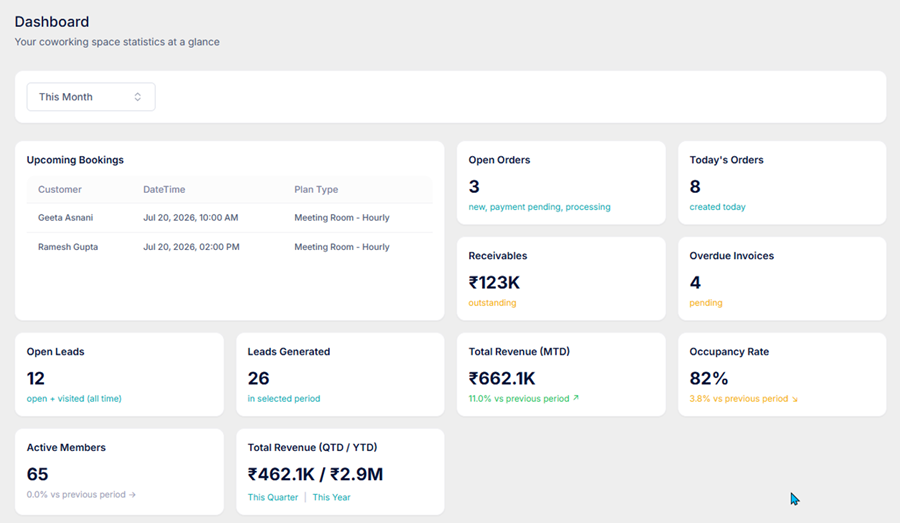
Use that pair of views — the floor, then the report — before you touch a price. A practical reading looks like this:
- Stays full. Consider a higher rate on the next renewal or new sale, or a waitlist, before you add more of the same inventory.
- Stays empty. Test one change: a lower rate, a shorter plan, a day pass, or bundling the weak cabin with something members already want. Change one thing so you can see whether the layout fills.
- Meeting rooms. Judge them on booked hours and booking revenue. A room that looks empty at 11 a.m. may still earn its keep after 4 p.m. A room that is booked all day at a low hourly rate may need a price change more than a marketing push.
None of this requires a complicated yield-management model. It requires seeing which product moves and which does not, then setting the next price from that evidence. Review the same layout and the same occupancy cards after the change. If the empty cabin starts booking, the test worked. If it stays empty, the problem may be position, noise, or the plan itself — not the rupee amount on the rate card.
A weekly occupancy habit
Occupancy management fails when it is a quarterly project. It works when it is a short weekly pass. Block twenty minutes and do only this:
- Open the visual layout for today and for the same weekday next week.
- Mark two lists: resources that are full on both days, and resources that are free on both.
- Check maintenance so blocked rooms are not treated as unsold inventory.
- Glance at the dashboard — cabin and desk occupancy, meeting room occupancy, total occupancy — and at one report if a category looks off.
- Change one commercial lever: a price, a plan, a day-pass offer, or the way the front desk describes what is open. Write down what you changed.
- Look again next week. Did the empty group shrink? Did the full group create a waitlist? Keep the change or try a different one.
One change a week is enough. Operators who reprice everything at once cannot tell which decision moved occupancy. Operators who look at the floor every week can.
How Coworking App helps
Coworking App is built for operators running the space day to day, including occupancy. You get:
- Space Availability — a visual layout of the location, by date, with free, booked, and maintenance states, plus a calendar for meeting rooms
- Dashboard occupancy — cabin and desk, meeting room, and total occupancy, with a daily trend
- Occupancy reports — workspace utilization, inventory by category, meeting room utilization and booking revenue, and location-wise occupancy
- The next step in the same product — leads, quotes, bookings, and billing sit next to the layout, so a free cabin you see on the floor can become a booking without exporting a spreadsheet
Plans start at ₹2,499/mo for one location. The point of the layout is not another chart. It is a clearer view of what you have left to sell, and a calmer way to decide what that space should cost.
FAQs
What is occupancy management in a coworking space?
Occupancy management is tracking which desks, cabins, meeting rooms, and other resources are booked, free, or unavailable — and using that picture to sell open inventory and adjust pricing. It covers both the live view of the floor and the reports that show utilization over time.
Why does a visual floor layout beat a spreadsheet or a list?
A list of bookings hides patterns. A visual layout shows the whole floor for a chosen date, with each space marked free, booked, or in maintenance. Empty zones and fully booked clusters are obvious at a glance, so your team can act during a tour instead of waiting for a month-end report.
How does occupancy data help set or adjust pricing?
Spaces that stay full are candidates for a higher rate or a waitlist. Spaces that stay empty most weeks are candidates for a different plan, a day-pass offer, or a lower rate. Meeting rooms should be judged on utilization and booking revenue, not on whether they look busy on one afternoon.
Where does Coworking App show occupancy?
Coworking App shows a visual Space Availability layout of your floor, occupancy cards on the dashboard for cabins and desks, meeting rooms, and total occupancy, plus reports for workspace utilization, inventory, meeting rooms, and location-wise occupancy.
Conclusion
Visual occupancy management gives you something a single percentage cannot: a clear view of which desks, cabins, and rooms are actually selling. That visibility helps the team sell what is open, avoid promising what is booked or under maintenance, and adjust pricing from the pattern on the floor.
If you want that layout, the occupancy dashboard, and utilization reports in the same system you already use for members and billing, Coworking App is built for that workflow. See how operators run it, or compare it with other platforms on our blog.
Ready to simplify your coworking operations?
See why operators across India choose Coworking App — easy to use, easy to onboard, and built for real coworking workflows.